
Overview
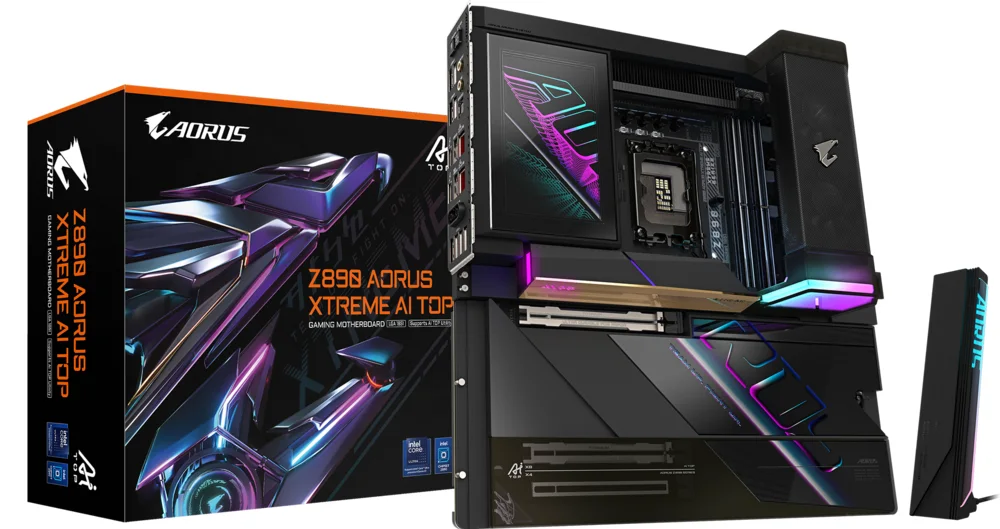
The Z890 AORUS XTREME AI TOP is GIGABYTE’s flagship for Intel’s LGA1851 desktop platform. It supports Core Ultra 200S processors (codename Arrow Lake), such as the Core Ultra 9 285K. The board is built in E-ATX format, so it is wider than a normal ATX board and needs a correspondingly large case. According to dealer reports, it went on sale in Japan in late November 2024.
The “AI TOP” name places it in GIGABYTE’s lineup for local AI training. That lineup also includes the TRX50 AI TOP and W790 AI TOP workstation boards, as well as graphics cards, power supplies, and SSDs. The connecting piece is the AI TOP Utility software, which GIGABYTE says can be used to fine-tune open language models on your own PC. Technically, though, the Z890 AORUS XTREME AI TOP is a desktop board for gamers and overclockers with very good features, not a workstation platform.
What it brings for AI
For local AI, the most important things are how many graphics cards you can install and how much memory you have available in total. This is where the desktop platform sets tight limits. The board has two long PCIe 5.0 slots that are directly connected to the processor. With one card, the first runs at the full 16 lanes (data lines). If you install a second card, both share the lanes and each runs at eight lanes. PCIe 5.0 x8 matches PCIe 4.0 x16 in bandwidth. For running language models split across two cards, that is usually not a bottleneck.
With two 32 GB graphics cards, such as two RTX 5090s, you get 64 GB of graphics memory. As a rough rule of thumb, a language model with 4-bit quantization (reduced weights) needs about 0.6 GB per billion parameters, plus buffer space for the context. A 70-billion-model therefore takes up about 42 GB and fits with room to spare. Models around 100 billion parameters get tight. With two 24 GB cards (48 GB), a 70B model in 4-bit is tight, but often doable.
Anything that does not fit into graphics memory can be offloaded to system RAM by programs like llama.cpp. According to GIGABYTE, the board supports up to 256 GB DDR5 in four slots. But the memory only runs on two channels. In theory, that works out to a little over 100 GB/s with DDR5-6400. A Threadripper platform with four or eight channels provides several times that. So offloaded parts of a model run noticeably slower than they would in graphics memory. For large mixture-of-experts models (models made up of many sub-networks, only some of which compute at a time), where only part of the weights is needed per token, 256 GB is still useful.
The networking setup is the real AI highlight. Two 10-gigabit ports and two Thunderbolt 5 ports let you connect multiple PCs quickly or load large model files from the NAS. GIGABYTE advertises local training of language models up to 236 billion parameters on the product page. That figure applies to the AI TOP platform as a whole; the page does not say exactly which hardware combination it refers to.
Features in detail
According to GIGABYTE, the CPU power delivery uses 22+1+2 phases with 110 A power stages. That is very generous for a desktop processor and is mainly aimed at overclockers. Power comes from a 24-pin ATX connector and two 8-pin CPU connectors. The manual does not mention any additional power connector for the PCIe slots.
In addition to the two graphics card slots, there is a third long slot that only has four PCIe 4.0 lanes from the chipset electrically. It shares lanes with the fourth M.2 slot. According to the manual, the two CPU-connected slots only support graphics cards or NVMe SSDs.
There are four M.2 slots for SSDs. One is connected via PCIe 5.0, three via PCIe 4.0. Two hang off the processor, two off the chipset. There are also four SATA ports. That is practical for AI: model files are often dozens of gigabytes in size, and a fast SSD shortens load times.
On the rear panel you get two Thunderbolt 5 ports (USB-C, up to 80 Gbit/s per direction according to Intel specs), ten USB-A ports at 10 Gbit/s, the two 10GbE ports with Marvell AQC113C chips, and the antenna connectors for Wi-Fi 7 (Intel BE200). At the front, you can use an additional USB4 port with Thunderbolt 4. Audio is handled by an ESS converter, and a small USB DAC is included. A fan for the memory modules is also included.
Who is it for?
This board makes sense if you are already building a fast Intel desktop, plan to game or overclock on it, and also want to run language models with one or two graphics cards. The 10GbE and Thunderbolt 5 ports are a real advantage if you connect multiple computers or work a lot with a NAS. If you only use one graphics card, the board still gives you full PCIe 5.0 connectivity and plenty of SSD space.
Limitations
The “AI” in the name is mostly marketing. You cannot use more than two graphics cards, and with two cards both only run at eight lanes. RAM is limited to 256 GB and two channels. ECC memory is detected, but according to the manual it runs without error correction. For serious training of large models, a workstation platform like TRX50 is clearly better.
Then there is the price. German retailers charged between just over €900 and more than €1,400. For that money, you get a lot of features that do not matter for AI, such as the elaborate audio and the overclocking functions. The E-ATX format requires a large case, two powerful graphics cards need a strong power supply, and good cooling is a must.
Alternatives
- GIGABYTE TRX50 AI TOP: Threadripper platform with four fully connected x16 slots and up to 2 TB of RAM. More expensive, but the clearly better choice for multiple graphics cards and heavy offloading.
- GIGABYTE X870E AORUS XTREME AI TOP: the AMD counterpart with similar features, two PCIe 5.0 slots, and dual 10GbE. The AM5 platform has the longer future.
- GIGABYTE Z890 AORUS MASTER AI TOP: the smaller Z890 version of the same series if you can live without some of the features.
This report is based on manufacturer information and published tests; we did not test the device ourselves.