
ComfyUI
A very flexible program for AI image, video, and audio, where you put together workflows from nodes.
- By
- Comfy Org
- Use
- Web interface in the browser with node editor (also as a desktop app)
- Price
- free (plus optional cloud service Comfy Cloud)
- License
- GPL-3.0
- Version
- v0.42.1 (Oct 19, 2026)
What is ComfyUI?
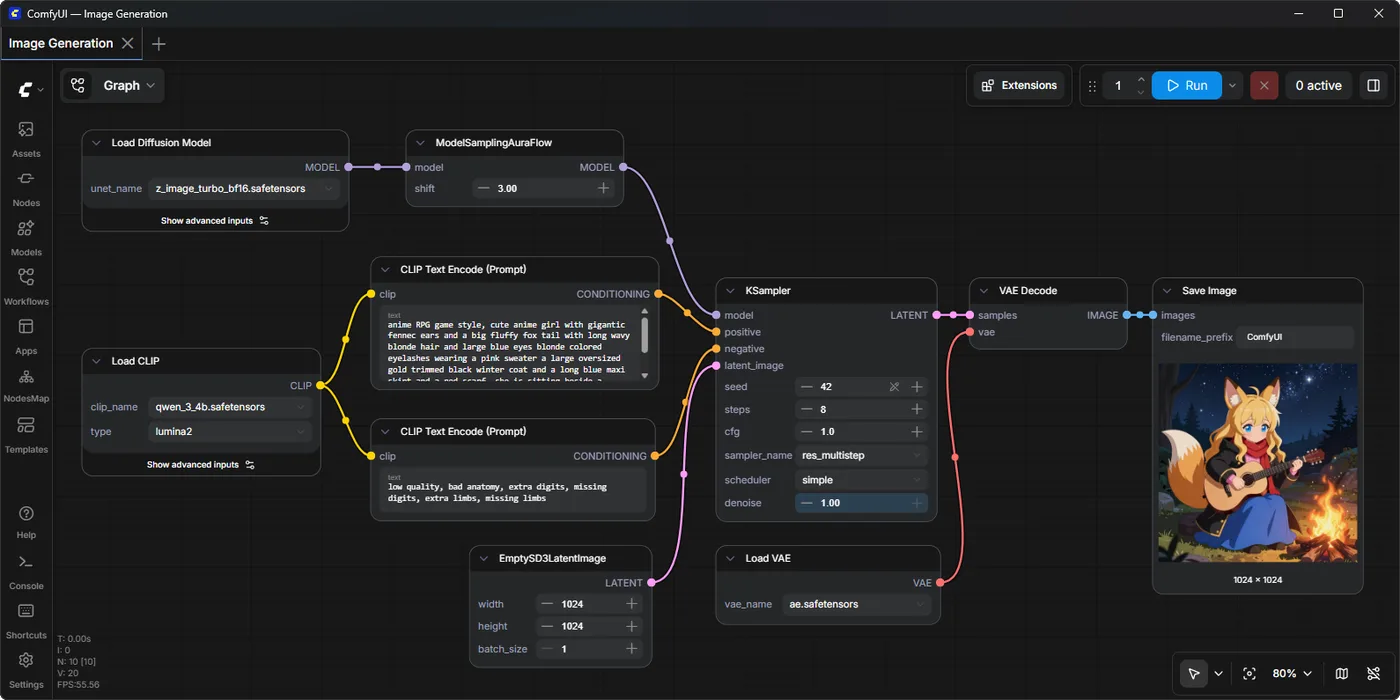
ComfyUI is currently the central tool for local image and video AI. Instead of a fixed form, you build workflows from nodes that you connect with lines: load a model, enter a prompt, generate an image, upscale. New models are usually supported here first. At first the interface seems confusing, but there are many ready-made templates you can simply load. It is suitable for anyone who wants more control and is willing to spend some time learning it.
For you if you want to use the latest image and video models and precisely control what happens.
Strengths
- Usually supports new models first
- Very flexible thanks to node workflows
- Desktop app and portable version for Windows
- Huge selection of extensions (custom nodes)
- Runs on NVIDIA, AMD, Intel, and Apple
Weaknesses
- Node interface can be confusing at first for beginners
- Third-party extensions can introduce conflicts or security risks
- Frequent updates sometimes change workflows
Does it run on your system?
| Operating system | Hardware | ||
|---|---|---|---|
| Windows | yes | NVIDIA | yes |
| Linux | yes | AMD | yes |
| macOS | yes | Intel Arc | yes |
| Apple (M chips) | yes | ||
| processor only | limited |
For Windows, there are separate portable packages for NVIDIA (CUDA), AMD (ROCm), and Intel; a CPU mode is possible, but very slow.
Installation
The easiest way is to download the official desktop app (Windows installer .exe) from comfy.org. Alternatively, there is a portable 7z version for NVIDIA, AMD, or Intel: unpack it and start the matching run_…_gpu.bat.
Download programs only from the official site or the official repository.
Step by step: Set up and maintain ComfyUI on Windows, Your First Image with ComfyUI, Your First AI Video with LTX in ComfyUI
License
You may use, modify, and share ComfyUI for free; anyone who distributes a modified version must also disclose its source code under GPL-3.0.
The program license is something different from the model licenses you use in it. Whether you may sell results depends on the model; see Licenses. Not legal advice.
Models that run on it
- Images FLUX.2 [klein] 4B Sales allowed
- Images FLUX.2 [klein] 9B With conditions
- Images FLUX.2 [dev] With conditions
- Images FLUX.1 [schnell] Sales allowed
- Images Z-Image Turbo Sales allowed
- Images Qwen-Image Sales allowed
- Images Stable Diffusion XL 1.0 Sales allowed
- Images Stable Diffusion 3.5 Large With conditions
- Images Stable Diffusion 3.5 Medium With conditions
- Images HiDream-I1 (Full/Dev/Fast) Sales allowed
- 3D models TRELLIS.2 (4B) Unresolved
- 3D models Pixal3D Unresolved
- 3D models Hunyuan3D 2.1 Non-commercialnot in the EU
- Video Wan 2.2 TI2V 5B Sales allowed
- Video Wan 2.2 A14B (T2V / I2V, MoE) Sales allowed
- Video LTX-2.3 (22B) With conditions
- Video LTX-2 (19B) With conditions
- Video LTX-Video 0.9.8 (2B / 13B) With conditions
- Video HunyuanVideo 1.5 Non-commercialnot in the EU
- Cut out BiRefNet Sales allowed
- Cut out BRIA RMBG 2.0 Non-commercial
- Images FLUX 3 Image [klein] With conditions
- Images Qwen-Image-2.1 Non-commercial
- Images Krea 2 (Raw / Turbo) With conditions
- Images Ideogram 4.0 Non-commercial
- Images Z-Image (Base) Sales allowed
- Images Qwen-Image-Edit-2511 Sales allowed
- Images FLUX.1 Kontext [dev] With conditions
- Images Chroma1-HD Sales allowed
- Images HiDream-O1-Image (Full / Dev) Sales allowed
- Images MOSS-Image (Base / SFT) Sales allowed
- Images Anima (Base / Aesthetic / Turbo) With conditions
- Video LTX-2.5 (22B) With conditions
- Video Kandinsky 6.0 Video Lite (3B) Sales allowed
- Video Kandinsky 6.0 Video Pro (29B) Sales allowed
- Video MiniMax H3 (FL2VA / Ref2VA) With conditionsnot in the EU
Alternatives
SwarmUI
Beginner-friendly web interface for image, video, and audio models that uses ComfyUI in the background.
InvokeAI
Clean image editor with canvas, layers, and inpainting, ideal for creative work.
Stable Diffusion WebUI Forge – Neo
Actively maintained fork of Forge with the classic A1111 interface and support for current models.
Krita AI Diffusion
Plugin that brings AI image generation directly into the free painting app Krita, with ComfyUI in the background.
ComfyUI compared
Known errors and solutions
- 'git' is not recognized
- 'python' is not recognized or opens the Microsoft Store
- [SSL: CERTIFICATE_VERIFY_FAILED] certificate verify failed: unable to get local issuer certificate – Python does not trust the certificate (often a company proxy or antivirus)
- A module that was compiled using NumPy 1.x cannot be run in NumPy 2.x – a package does not match the installed NumPy version
- Allocation on device (ComfyUI reports too little VRAM)
- AMD Radeon is not being used, PyTorch is running on the CPU
- Black images or NaN values (VAE precision)
- Cannot execute because a node is missing the class_type property (Node not loaded or wrong workflow format)
- clip missing: ['text_projection.weight'] (usually a harmless warning)
- ComfyUI-Manager: This action is not allowed with this security level
- ControlNet: Error(s) in loading state_dict … size mismatch (ControlNet does not match the base model)
- CUDA gone after installing a custom node or package
- CUDA out of memory (VRAM full)
- CUDAExecutionProvider is not in available provider names (onnxruntime runs only on the CPU)
- Custom Node: IMPORT FAILED
- Error loading c10.dll (WinError 126 / 1114)
- Error while deserializing header (corrupted model file)
- ERROR: clip input is invalid: None (Checkpoint contains no text encoder)
- ERROR: Could not detect model type of: … (Model is in the wrong folder or the wrong loader)
- ERROR: Could not install packages due to an OSError: [WinError 5] Access is denied – pip cannot modify a file
- Expected all tensors to be on the same device (data partly on GPU, partly on CPU)
- expected input … to have 4 channels, but got 16 channels instead (latent or VAE does not match the model)
- expected scalar type Half but found Float (number formats do not match)
- Failed building wheel for insightface (insightface for ReActor/IPAdapter FaceID won’t install)
- ffmpeg is required for video outputs and could not be found (Video Combine cannot save a video)
- Frontend package outdated after update (comfyui-frontend-package)
- hipErrorNoBinaryForGpu: Unable to find code object for all current devices! (ROCm has no matching code for your AMD card)
- HostBuffer.read_file_slice failed (crash caused by the new Dynamic VRAM memory management)
- Hugging Face download stops or hangs (.incomplete)
- Hugging Face: 429 Client Error: Too Many Requests / We had to rate limit you – too many requests, you’re being throttled
- Hugging Face: Cannot access gated repo (401)
- ImportError: DLL load failed while importing …: The specified module could not be found – a Python package is missing a Windows DLL
- Intel Arc not recognized (torch.xpu)
- IPAdapter model not found / ClipVision model not found (IPAdapter files are missing or named incorrectly)
- lora key not loaded (LoRA does not match the model or the loader)
- mat1 and mat2 shapes cannot be multiplied (models don’t match)
- Missing Node Types (nodes not found in the workflow)
- module 'torch' has no attribute 'float8_e4m3fn' (PyTorch too old for fp8)
- no kernel image is available (graphics card does not match the PyTorch version)
- No matching distribution found for torch (wrong Python version)
- No module named 'sageattention' (starting with --use-sage-attention fails)
- No module named 'triton' on Windows (triton-windows missing)
- No module named … (missing Python package for custom node)
- OSError: [WinError 1455] The paging file is too small for this operation to complete (Windows paging file is too small)
- Path too long: Filename too long / Windows Long Path support
- PC restarts or the screen goes black under full GPU load
- pip: error: externally-managed-environment (Linux/WSL)
- pip: Microsoft Visual C++ 14.0 or greater is required
- Prompt outputs failed validation / Value not in list (Model missing)
- Prompt outputs failed validation: Required input is missing (Required input not connected)
- Reconnecting / Failed to connect to server
- RuntimeError: CUDA error: an illegal memory access was encountered – the graphics card accessed invalid memory
- SafetensorError: incomplete metadata / MetadataIncompleteBuffer
- SwarmUI: All available backends failed to load the model (the real error is in the log)
- The NVIDIA driver on your system is too old
- Torch not compiled with CUDA enabled
- torch._scaled_mm is only supported on CUDA devices with compute capability >= 9.0 or 8.9 (fp8 fast mode needs RTX 40 or newer)
- Unexpected architecture type in GGUF file (ComfyUI-GGUF doesn’t know the model yet)
- UserWarning: Torch was not compiled with flash attention – usually harmless on Windows
- venv activation blocked: running scripts is disabled on this system
- Warning: Ran out of memory when regular VAE decoding, retrying with tiled VAE decoding (VAE decoding falls back to tiles)
- Weights only load failed / Unsupported global (PyTorch blocks old .pt models starting in 2.6, e.g. YOLO in the Impact Pack)
- Windows SmartScreen or Defender blocks an installer or .exe
- xFormers can't load C++/CUDA extensions (version conflict)
News about ComfyUI
All news
Sources
- https://github.com/Comfy-Org/ComfyUI
- https://github.com/Comfy-Org/ComfyUI/releases
- https://github.com/Comfy-Org/ComfyUI/releases/tag/v0.42.1
- https://docs.comfy.org/installation/desktop/windows
- https://docs.comfy.org/installation/comfyui_portable_windows
Checked on Oct 21, 2026. Questions about ComfyUI? Ask in the forum.