
InvokeAI
Clean image editor with canvas, layers, and inpainting, ideal for creative work.
- By
- InvokeAI-Community (Lincoln Stein, Blessedcoolant)
- Use
- Web interface in the browser (as a desktop app via launcher)
- Price
- free
- License
- Apache-2.0
- Version
- v6.14.2 (Sep 27, 2026)
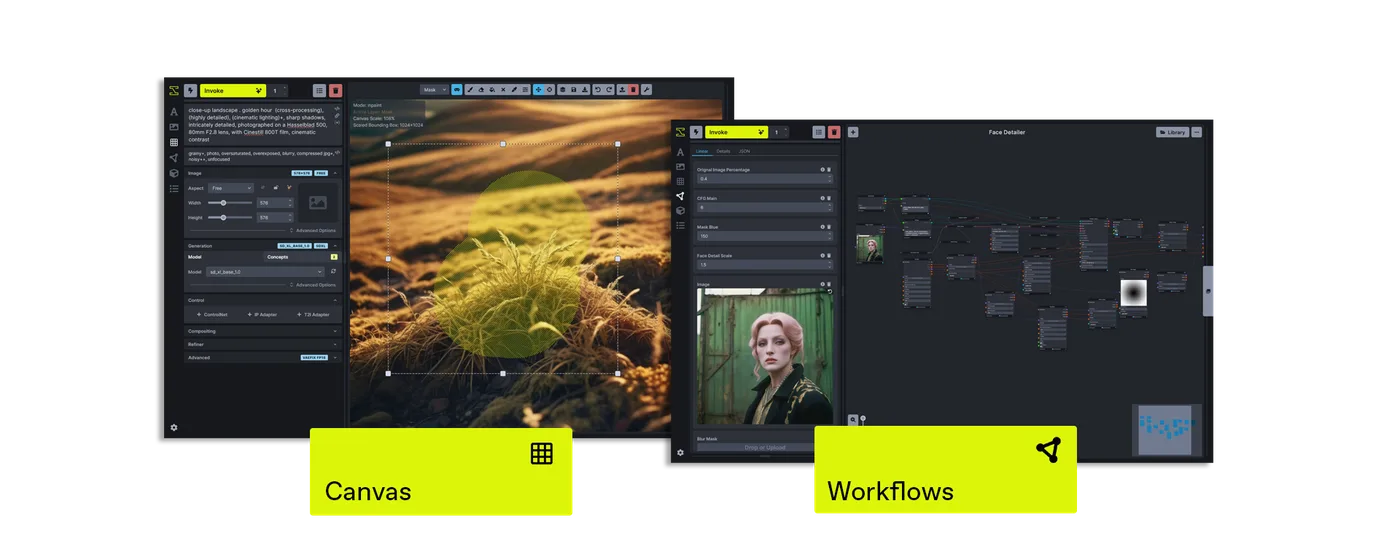
What is InvokeAI?
InvokeAI feels more like a graphics program than a technical tool. Its core is a canvas with layers where you can regenerate, expand, or paint over areas. It also includes a gallery, model management, and a node editor for advanced users. It supports, among others, SDXL, Flux, Flux.2 Klein, Z-Image, Krea-2, and Wan 2.2. Good for anyone who wants to create and refine images with precision.
For you if you want to edit and refine images in a painting app with precision.
Strengths
- Very clean, polished interface
- Powerful canvas with layers and inpainting
- Easy installation via launcher
- Free Apache license
Weaknesses
- AMD not supported on Windows
- No company behind it anymore, only the community
Does it run on your system?
| Operating system | Hardware | ||
|---|---|---|---|
| Windows | yes | NVIDIA | yes |
| Linux | yes | AMD | limited |
| macOS | yes | Intel Arc | yes |
| Apple (M chips) | yes | ||
| processor only | limited |
AMD is supported only on Linux (ROCm), not on Windows; Intel Arc runs on Windows and Linux; Macs with Apple Silicon and at least 16 GB of memory are recommended.
Installation
You download the Invoke Launcher (.exe) from invoke.ai; it installs and starts InvokeAI and helps load the models.
Download programs only from the official site or the official repository.
License
Free license: You may use and modify InvokeAI for free for personal and commercial use; the models used are subject to their own licenses.
The program license is something different from the model licenses you use in it. Whether you may sell results depends on the model; see Licenses. Not legal advice.
Alternatives
Krita AI Diffusion
Plugin that brings AI image generation directly into the free painting app Krita, with ComfyUI in the background.
ComfyUI
A very flexible program for AI image, video, and audio, where you put together workflows from nodes.
SwarmUI
Beginner-friendly web interface for image, video, and audio models that uses ComfyUI in the background.
InvokeAI compared
Known errors and solutions
- 'python' is not recognized or opens the Microsoft Store
- Hugging Face download stops or hangs (.incomplete)
- Hugging Face: Cannot access gated repo (401)
- No matching distribution found for torch (wrong Python version)
- SafetensorError: incomplete metadata / MetadataIncompleteBuffer
- The NVIDIA driver on your system is too old
- venv activation blocked: running scripts is disabled on this system
Sources
- https://github.com/invoke-ai/InvokeAI
- https://github.com/invoke-ai/InvokeAI/releases
- https://github.com/invoke-ai/InvokeAI/releases/tag/v6.14.2
- https://invoke.ai
- https://invoke.ai/start-here/system-requirements/
Checked on Oct 21, 2026. Questions about InvokeAI? Ask in the forum.