
LM Studio
Convenient desktop app for searching, downloading, and chatting with local language models, including a local API server.
- By
- Element Labs (LM Studio)
- Use
- Desktop app
- Price
- free, additional subscriptions Bionic+ (20 USD/month) and Pro (100 USD/month) are paid
- License
- proprietary, free for private use and internal use within companies
- Version
- 0.4.26
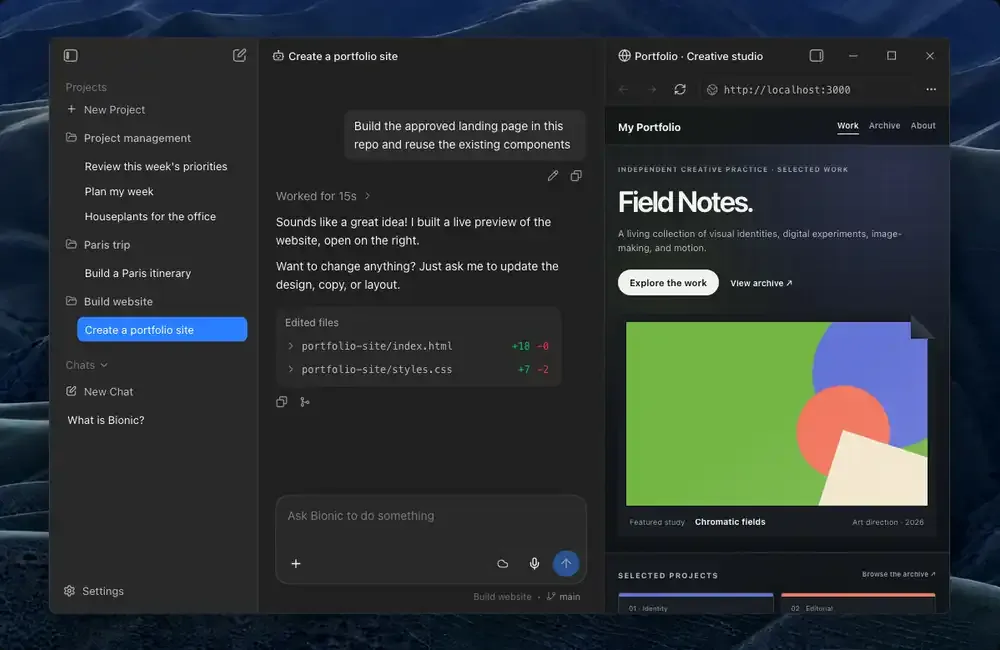
What is LM Studio?
LM Studio is a desktop app where you can find language models, download them, and chat with them directly. You can attach documents to messages and work completely offline once the models are loaded. A built-in server exposes your models through an OpenAI-like interface, and you can connect tools via MCP. Since July 2025, the app has also been free for work, with no form. The source code is not open, and new add-ons like the Bionic Agent or hosted models are partly paid.
For you if you want to try local models without the command line and open source is not important to you.
Strengths
- Very beginner-friendly interface
- Model search and download directly in the app
- Local API server and MCP support
- Free for private and work use
Weaknesses
- Not open source
- Requires a CPU with AVX2 and, on macOS, Apple Silicon
- Paid add-on subscriptions are pushed more strongly into the foreground
Does it run on your system?
| Operating system | Hardware | ||
|---|---|---|---|
| Windows | yes | NVIDIA | unclear |
| Linux | yes | AMD | unclear |
| macOS | yes | Intel Arc | unclear |
| Apple (M chips) | yes | ||
| processor only | yes |
Works with llama.cpp and, on Apple Silicon Macs, additionally with MLX; for Windows, the documentation recommends at least 4 GB VRAM, but does not name any specific GPU manufacturers. The CPU must support AVX2, Intel Macs are not supported.
Installation
You download the Windows installer from lmstudio.ai and install it like a normal program. After that, you search for and download models directly in the app.
Download programs only from the official site or the official repository.
Step by step: LM Studio: Your First Local Chat
License
proprietary, free for private use and internal use within companies
According to the Terms of Use (as of 23.08.2026), you may use LM Studio privately and for internal business purposes, but you may not modify it, resell it, or offer it as a service to third parties.
The program license is something different from the model licenses you use in it. Whether you may sell results depends on the model; see Licenses. Not legal advice.
Models that run on it
- Text and chat Qwen3.5 27B Sales allowed
- Text and chat gpt-oss-20b Sales allowed
- Text and chat gpt-oss-120b Sales allowed
- Text and chat Qwen3.8 27B Sales allowed
- Text and chat Gemma 4 12B Sales allowed
- Text and chat NVIDIA Nemotron 3.5 Bolt 74B-A9B (MoE) Sales allowed
Alternatives
Jan
Open-source desktop app as a local ChatGPT alternative that runs offline and can also connect cloud models.
Ollama
A lightweight service that loads language models with one command and runs them locally — the foundation for many other interfaces.
GPT4All
A simple desktop app for chatting with local models and your own documents, but it is hardly being developed anymore.
LM Studio compared
Known errors and solutions
- AMD graphics card not being used (ROCm or Vulkan)
- Confusing answers, endless loops, or tags like <|im_end|> (wrong chat template)
- GGUF: tensor '…' data is not within the file bounds, model is corrupted or incomplete (model file incomplete)
- GGUF: unknown model architecture (program too old for the model)
- llama.cpp: CUDA error: out of memory
- LM Studio: Error loading model. (Exit code: …) Unknown error (model won’t load)
- LM Studio: Error rendering prompt with jinja template (Model chat template cannot be processed)
- LM Studio: Model loading was stopped due to insufficient system resources
- LM Studio: No LM Runtime found
- LM Studio: This message contains no content. The AI has nothing to say. (Reply remains empty)
- LM Studio: Trying to keep the first … tokens when context the overflows (Input is longer than the configured context length)
- MCP error -32000: Connection closed (MCP server does not start or quits immediately)
- Model forgets the beginning or ignores long texts (context length too small)
- Very slow responses because the model does not fit in VRAM
- Windows SmartScreen or Defender blocks an installer or .exe
News about LM Studio
All news
Sources
- https://lmstudio.ai/
- https://lmstudio.ai/terms
- https://lmstudio.ai/pricing
- https://lmstudio.ai/download
- https://lmstudio.ai/docs/app
- https://lmstudio.ai/docs/app/system-requirements
- https://www.lmstudio.ai/blog/free-for-work
Checked on Oct 21, 2026. Questions about LM Studio? Ask in the forum.