
Overview
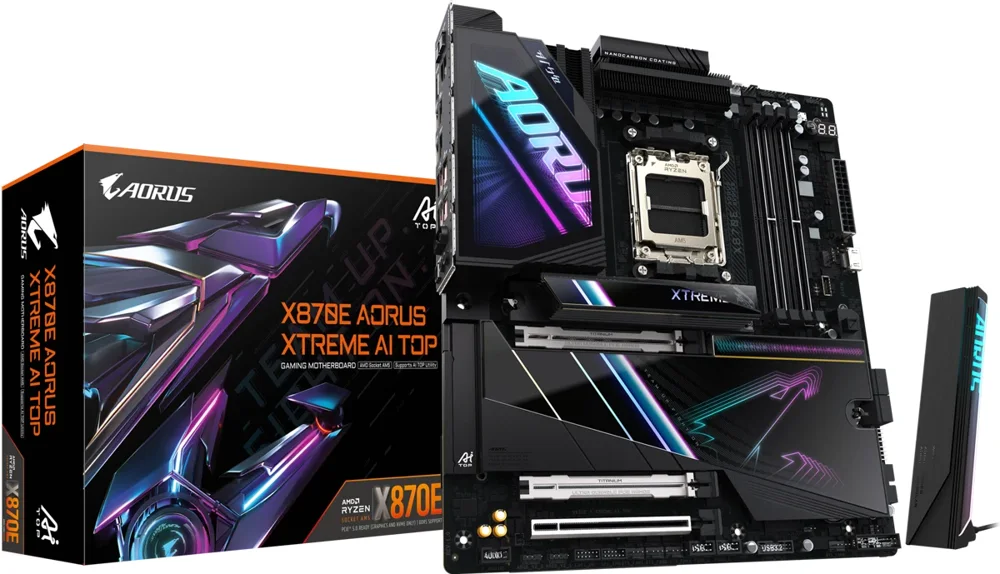
The GIGABYTE X870E AORUS XTREME AI TOP is the top model of the first AM5 generation with X870E chipset from GIGABYTE's AORUS lineup. It went on sale when the X870E boards launched at the end of September 2024; GIGABYTE's press release for the series is dated October 1, 2024. It supports Ryzen 7000, 8000, and 9000 series processors and also carries the logo of the “AI TOP” series. Under this name, GIGABYTE bundles hardware and the AI TOP Utility software, which lets you retrain language models on your own PC. The packaging explicitly says “Supports AI TOP Utility.”
Technically, the board is a classic enthusiast motherboard for gamers and overclockers. It is not a workstation platform like the TRX50 AI TOP. There is now a successor, the X870E AORUS XTREME X3D AI TOP. Tom's Hardware therefore recommends in its review that you only buy the older model if it is offered at a significantly lower price.
What it brings for AI
For local AI, what matters most is how many graphics cards you can install and how fast they are connected. According to GIGABYTE, the board has two long PCIe 5.0 slots that connect directly to the processor. If only one card is installed in the top slot, it gets all 16 lanes, meaning data lines. As soon as the second slot is occupied, both cards share the lanes at x8/x8 each. PCIe 5.0 x8 is, in terms of bandwidth, equivalent to PCIe 4.0 x16. That is fine for running language models (inference), because after loading only a small amount of data travels over the bus.
With two graphics cards, you can split a model across both cards. A rule of thumb: a 4-bit reduced (quantized) language model needs about 0.6 GB of VRAM per billion parameters, plus buffer space for context. Two cards with 24 GB each, or 48 GB total, are enough for models up to roughly 70 billion parameters, though only just. With two 32 GB cards, you have 64 GB and more room for long contexts.
RAM is the bottleneck of this platform. There are four DDR5 slots and only two memory channels, with a maximum of 256 GB. If a model does not fit in VRAM and parts are swapped out to RAM, the limited bandwidth of two channels slows text output significantly. Workstation platforms with four or eight channels have a clear advantage here.
The two 10-gigabit network ports (10GbE) help when copying large model files from a NAS quickly. GIGABYTE also markets them for compute work across multiple computers. For distributed training across several systems, however, 10 Gbit/s is rather limited.
Details
According to GIGABYTE, the full slot configuration is only available with Ryzen 7000 and 9000. With Ryzen 8000 models (Phoenix), the top slot runs only at PCIe 4.0 x8 or x4, and the second one is disabled entirely. The third long slot is connected to the chipset and is electrically only PCIe 4.0 x2. It shares lanes with the fourth M.2 slot. It is hardly suitable for a third graphics card. GIGABYTE also states that the two processor slots support only graphics cards or NVMe SSDs.
For storage, there are four M.2 slots. One is connected to the processor via PCIe 5.0 x4, two via PCIe 4.0 x4, and one via PCIe 4.0 x2 on the chipset. There are also four SATA ports. Tom's Hardware criticizes the fact that a flagship model has only one M.2 slot with PCIe 5.0.
According to GIGABYTE, the power delivery is designed with 18+2+2 phases and 110A power stages. Tom's Hardware measured a maximum of 49 °C on the VRMs in its stress test. On the rear panel there are two USB4 ports with 40 Gbit/s, six USB-A ports with 10 Gbit/s, two USB 2.0 ports, HDMI, Wi-Fi 7, and two 10GbE ports with Marvell chips (AQC113C). According to a user report on PCPartPicker, the network chip works under Linux without extra drivers. There is no remote management chip (BMC) like the ones server boards have.
Who is it for?
This board is a good fit if you want to build a powerful gaming or work PC on AM5 and also run language models with one or two graphics cards. If you need fast networking for a NAS with models and datasets, you get it built in twice. The board becomes especially interesting as refurbished hardware: Tom's Hardware lists a price of $599.99 for that and considers the board worthwhile at that price.
Limitations
The “AI” in the name is mostly marketing. Electrically, the board is not fundamentally different from other X870E flagship models. You cannot run more than two fast-connected graphics cards, and with just two cards each one’s link is already cut in half. Two memory channels and a maximum of 256 GB of RAM put tight limits on offloading large models.
Then there is the space requirement. Two thick graphics cards with three or four slots of height have to fit next to each other first, with enough breathing room. The board uses the E-ATX format at 30.5 × 26.9 cm, making it a bit wider than ATX. The price was high at launch: retail listed it for $799. According to Tom's Hardware, new units recently cost over $1,200 from third-party sellers. Tom's Hardware also measured higher power draw than most other boards: the test system drew 96 W at idle and up to 267 W under load.
Alternatives
- GIGABYTE X870E AORUS XTREME X3D AI TOP: the direct successor with more M.2 slots (two with PCIe 5.0), a display, and a newer audio solution, but more expensive.
- GIGABYTE B850 AI TOP: much cheaper, also with two 10GbE ports. For an AI PC with one graphics card, that is often enough.
- GIGABYTE TRX50 AI TOP: Threadripper platform with more slots and much more RAM, if you seriously want to work with multiple cards or offload large models. But it costs many times more.
This report is based on manufacturer information and published tests; we did not test the device ourselves.