
Overview
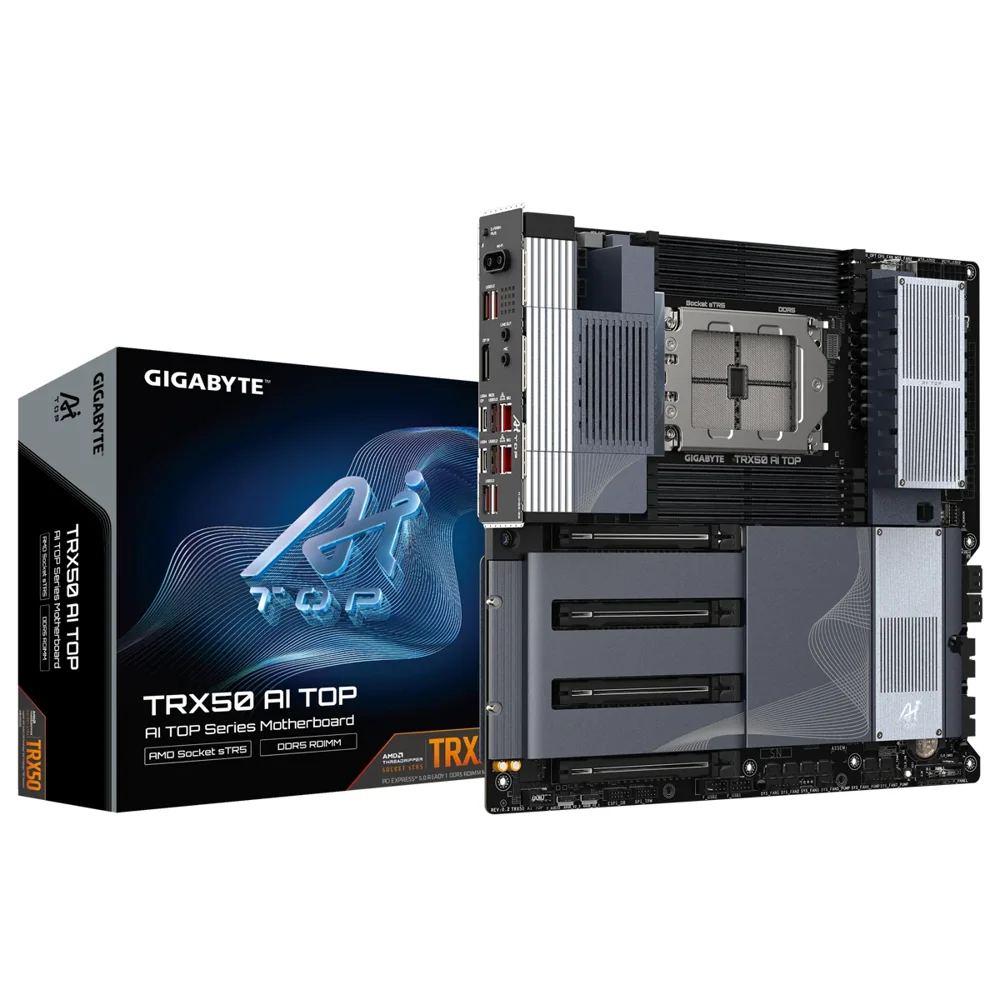
The GIGABYTE TRX50 AI TOP is a motherboard for AMD’s Ryzen Threadripper workstation processors (sTR5 socket). It is the largest model in the AI-TOP line, which GIGABYTE uses to target home and office PCs for training and fine-tuning AI models. GIGABYTE showed the board in June 2024 at Computex. According to the manufacturer, it supports Threadripper 7000 and 9000 as well as the PRO models 7000 WX and 9000 WX.
Unlike the AI-TOP boards for regular desktop processors (Z890, X870E, B850), this is a true multi-GPU platform: four full x16 slots, eight memory slots for Registered ECC RAM, and two 10-gigabit network ports. It is aimed at people who want to install multiple graphics cards in one system.
What it offers for AI
The main highlight is the four PCIe x16 slots, which GIGABYTE says are all directly connected to the CPU. PCIe is the link between the processor and the graphics card. Three slots run at PCIe 5.0 x16 with any supported processor, while the fourth only works with Threadripper 9000 and the PRO models. With a Threadripper 7000 without PRO, it drops back to PCIe 4.0 x16. So unlike on desktop boards, the cards do not share lanes.
What that means for language models can be roughly estimated: a 4-bit reduced (quantized) model needs about 0.6 GB of VRAM per billion parameters, plus buffer space for the context. Four cards with 32 GB each give you 128 GB. That is enough for models of roughly 150 to 180 billion parameters. With four professional cards with 96 GB each, you would have 384 GB. Programs like llama.cpp or vLLM split a model across multiple cards. The connection between the cards also matters, and here it is good thanks to full PCIe 5.0 lanes.
The second point is RAM. According to GIGABYTE, the board supports up to 2 TB. With a PRO processor, it works with eight memory channels, and with a regular Threadripper, four. More channels mean more bandwidth. That matters when a model does not fully fit in VRAM and parts are moved into RAM. For fine-tuning, meaning retraining a finished model with your own data, lots of RAM helps as working storage. GIGABYTE promotes its AI TOP Utility software for this, which controls fine-tuning and shows progress.
For clusters, there are two 10-gigabit Ethernet ports (Marvell AQC113C) and two USB4 ports with 40 Gbit/s each. That makes it possible to connect multiple computers or load large model files quickly from network storage.
Details
The board uses the E-ATX form factor and measures 30.5 × 33 cm. So you need a large case. The eight memory slots take DDR5 RDIMMs, which are registered modules with error correction (ECC) as commonly used in servers. Regular desktop modules do not fit.
For SSDs, there are four M.2 slots, all connected to the CPU. Three work with Threadripper 9000 and PRO models as PCIe 5.0 x4, and with Threadripper 7000 as PCIe 4.0 x4. The fourth (M2D) only works with the PRO processors according to GIGABYTE; it is disabled with regular Threadrippers. There are also four SATA ports. The review site Profesional Review also notes the connection of the two 10 GbE chips: each is connected to the chipset with two PCIe lanes.
According to GIGABYTE, the CPU power delivery has 16+8+4 digital phases. Profesional Review checked it: Infineon components rated at 110 A each are used for Vcore and SoC, and the board has 14 layers. Small fans in the heatsinks cool the voltage regulators. In addition to the 24-pin main connector and two 8-pin CPU connectors, GIGABYTE lists four PCIe power connectors that provide extra power to the slots. That matters when four graphics cards draw power through the slot.
On the back, there are six USB-A ports with 10 Gbit/s, two USB4 ports, a DisplayPort input (so the image from a graphics card can be output over USB-C), two network ports, and Wi-Fi 7 with Bluetooth 5.3. For error recovery, there is a debug display, power and reset buttons, and Q-Flash Plus for BIOS updates without a CPU. It does not have remote management via BMC/IPMI like server boards do. GIGABYTE lists Windows 11 and Ubuntu 24.04 LTS as supported operating systems.
Who is it for?
This board is worth it if you want to run three or four graphics cards in one system without sharing lanes. For example, for large language models split across multiple cards or for your own fine-tuning. You get the most out of it with a Threadripper PRO, because only then are all slots, all M.2 slots, and eight memory channels available.
If one or two graphics cards are enough for you, an AM5 or Intel desktop board is much cheaper. The same goes if you mainly run small to medium-sized models.
Limitations
The price is high. Profesional Review listed a price of 994 euro in August 2024, plus the Threadripper processor and expensive RDIMM memory. The full feature set is only available with a PRO processor. With a Threadripper 7000 without PRO, you get four memory channels, one fewer M.2 slot, and one x16 slot limited to PCIe 4.0.
Space is the second problem. According to GIGABYTE, the slots are designed for two-slot cards. Many current gaming cards are three to four slots thick. Four of those will not fit side by side, so you need narrow professional or blower-style cards, water cooling, or riser cables. Power is also an issue: according to NVIDIA, a GeForce RTX 5090 is rated at 575 W, and four of them would draw 2300 W by themselves. A single normal power supply cannot handle that. Profesional Review recommends plugging in all extra power connectors under high CPU load because the socket power lines get warm.
The “AI” in the name is more than marketing: four full x16 slots and lots of RAM are exactly what multi-GPU systems need. The AI-TOP software is an extra; you can also use any other AI software.
Alternatives
- ASUS Pro WS TRX50-SAGE WIFI: ASUS’s direct equivalent for the same platform.
- ASUS Pro WS WRX90E-SAGE SE or ASRock WRX90 WS EVO: boards for the larger WRX90 platform with seven x16 slots, only for Threadripper PRO.
- GIGABYTE W790 AI TOP: the sibling model for Intel Xeon W.
This report is based on manufacturer information and published tests; we did not test the device ourselves.