
Overview
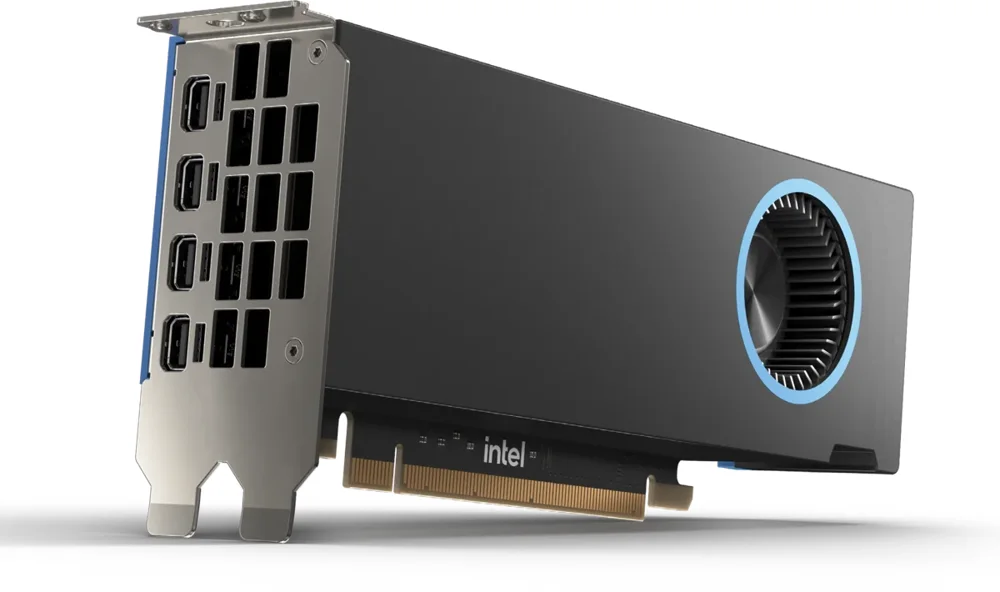
The Intel Arc Pro B50 is the smallest card in Intel’s Arc Pro B line of professional GPUs. It launched in September 2025 and is aimed at compact workstations, off-the-shelf office PCs, and small servers. Intel lists CAD, image editing, and AI inference as use cases. Inference means: a fully trained model is used, not retrained.
What stands out is the combination of 16 GB VRAM and only 70 W power draw. The card does not need a power cable from the PSU; it gets all its power directly from the slot. It has a low-profile design, but takes up two slots. A full-height bracket is included. In the lineup above it is the Arc Pro B60 with 24 GB, and at the top are the B65 and B70 with 32 GB.
According to Intel, the B50 costs US$349. At Computex 2025, Intel had still named a price of $299. ServeTheHome attributes the higher price to memory costs and tariff risks.
What it brings to AI
For local language models, VRAM matters first. As a rule of thumb, a quantized model reduced to 4 bits needs about 0.6 GB per billion parameters. Add buffer for the conversation history. In 16 GB, that means models up to roughly 14 to 20 billion parameters fit, with smaller models leaving plenty of room for long context. A single B50 is not enough for models with 30 billion parameters and more.
The weak point is memory bandwidth. At 224 GB/s, the B50 reads its memory only half as fast as the B60. When generating text, the card has to read the whole model from memory once for every new token. So less bandwidth means fewer tokens per second. A 12 GB model can theoretically reach at most just under 19 tokens per second, and less in practice.
StorageReview confirmed this in testing. In the UL Procyon benchmark (text generation), the site measured 45 tokens/s with Llama 3, 47 tokens/s with Mistral, and 72 tokens/s with Phi. That puts the B50 behind a GeForce RTX 5060 Ti and a Radeon RX 9060 XT. On time to first token, however, it was the fastest in this test. For image generation with Stable Diffusion XL, StorageReview says it needs around 49 seconds per image, which is slow.
Multiple B50s in one system are possible because they use little power. Intel markets multi-GPU operation under Linux mainly for the larger cards, though.
Hardware details
Inside, a partially disabled BMG-G21 chip with 16 Xe cores does the work. Each core contains eight XMX units. These are matrix compute units for AI, comparable to NVIDIA’s Tensor cores. Intel specifies 170 TOPS for INT8, meaning 170 trillion operations per second with 8-bit integers. According to Intel, FP32 performance is 10.65 TFLOPS.
The memory is connected via 128-bit and supports ECC. ECC detects and corrects memory errors, which is useful during long compute runs. The card uses PCIe 5.0, but only with eight lanes. It also works in older PCIe 4.0 motherboards.
Cooling is handled by a small 40 mm radial fan that pushes the warm air out through the slot bracket (blower). igorslab describes the cooler as very simple: a copper plate with an aluminum heatsink, without heatpipes. ServeTheHome found the card to be quiet in testing.
For displays, there are four Mini-DisplayPort 2.1 ports. Important for home labs: at the end of 2025, Intel officially enabled SR-IOV. This lets the card be split into virtual GPUs for multiple virtual machines, by default into two under Ubuntu. Users in the Level1Techs forum report, however, that setup is still a bit tricky in Proxmox, for example.
Who it is worth it for
The B50 makes sense if you want to add AI to a small, efficient system. For example, a mini-server, a compact office PC, or a workstation without the right power cables. It is suitable for small language models, speech recognition, embeddings for document search, and OpenVINO applications. If you want to try virtualization with a shared GPU, this is a low-cost entry point.
Limitations
The low bandwidth noticeably slows down language models. For 16 GB, gaming graphics cards often offer more speed per euro, but with higher power consumption and without a low-profile design.
Software is the second issue. Many AI programs are built around NVIDIA’s CUDA. Intel relies on oneAPI, OpenVINO, SYCL, and Vulkan. llama.cpp, Ollama variants, and vLLM run, but often with extra steps, custom containers, or patches. There are far fewer ready-made guides than for NVIDIA.
Despite its low-profile design, the card is two slots thick. In very slim cases, that can be a problem. The small fan also needs some airflow inside the case.
Alternatives
- Intel Arc Pro B60 (e.g. Sparkle Blower): 24 GB and double the bandwidth, but needs 200 W and a power connector.
- Intel Arc Pro B65: 32 GB and 608 GB/s for much larger models, in full size.
- NVIDIA RTX cards with 16 GB: faster for language models and with better software support, but usually without a low-profile design and with extra power.
This report is based on manufacturer information and published tests; we did not test the device ourselves.