
Overview
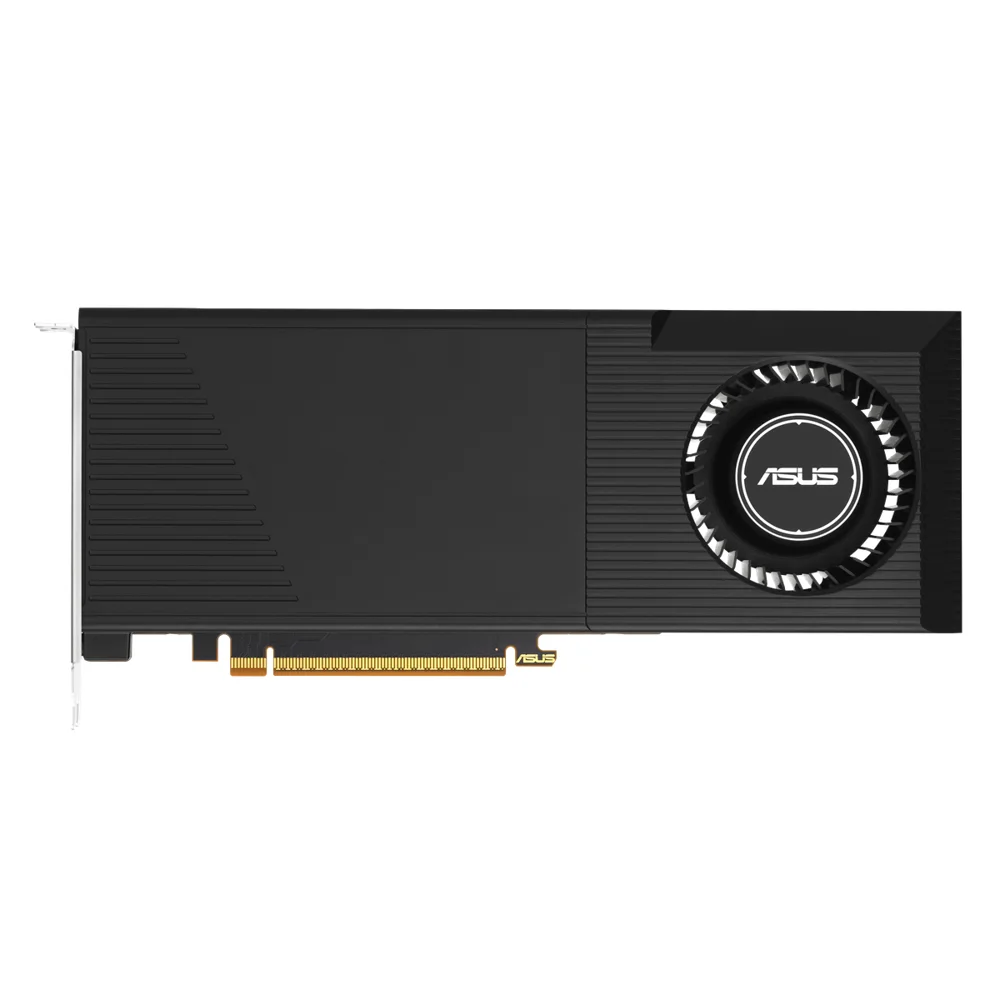
The ASUS Turbo Radeon AI Pro R9700 32G is ASUS’s version of AMD’s AI workstation card, the Radeon AI PRO R9700. ASUS announced it on September 22, 2025. The Turbo uses blower cooling, meaning a radial fan that pushes warm air out of the back of the case. That makes the card a fit for workstation PCs with multiple graphics cards and for tight cases.
The graphics chip is the same as on every R9700: a Navi 48 with RDNA 4 architecture, 64 Compute Units, and 32 GB GDDR6. The differences from other partner cards are in cooling, form factor, and ports.
What it means for AI
For local language models, VRAM is what matters first. With 32 GB, models of up to about 32 billion parameters fit comfortably on the card. As a rule of thumb, a model with 4-bit quantization, meaning compressed weights, needs about 0.6 GB per billion parameters. That puts a 32-billion-parameter model at about 19 GB, plus buffer for context. A 70-billion-parameter model needs about 42 GB and therefore two cards.
That is exactly what the Turbo is built for. At two slots wide and with blower cooling, you can place two, three, or four cards directly next to each other without them blowing hot air into one another. With two cards, you have 64 GB; with four, 128 GB.
Response speed depends mainly on memory bandwidth. According to AMD, it is 640 GB/s. For a 19 GB model, that works out to a theoretical maximum of a bit over 30 tokens per second, a little less in practice. Phoronix measured the R9700 in vLLM at an average of 1.47 times a Radeon PRO W7900. That test used AMD’s reference card, not the ASUS version.
Hardware details
ASUS uses a shroud and backplate made of die-cast metal. The backplate has folds and grooves that, according to ASUS, reduce memory temperature by up to 16 percent. Between the chip and cooler sits a phase-change pad. This is a thermal interface material that becomes liquid when heated and fills gaps. It is meant to last longer than normal thermal paste. There is also “GPU Guard,” meaning adhesive on the chip’s four corners, and a stainless-steel slot bracket.
According to ASUS, the card measures 266,7 × 111,1 × 40 mm and weighs 1,04 kg. Power comes through a 16-pin connector, and ASUS recommends a 750 W power supply. Clock speeds match AMD’s specifications in standard mode. With the GPU Tweak III program, you can enable an OC mode with 20 MHz more boost clock. For AI, that is mostly irrelevant because memory is usually the bottleneck.
Unlike some other R9700 cards, the Turbo has three DisplayPort 2.1a outputs plus an HDMI 2.1b port. That is useful if the card also needs to drive a regular monitor or TV.
ASUS lists 95,7 TFLOPS for FP16. AMD lists 47,8 TFLOPS as the vector value and 191 TFLOPS as the matrix value for the chip. So the numbers are not directly comparable.
Who is it for?
The Turbo makes sense if you are building a PC with multiple R9700 cards and value a sturdy metal design. It also fits if you want to connect an HDMI monitor alongside AI work. For a single card in a large, well-ventilated case, the blower offers little advantage.
Limitations
As with all Radeon cards, AI software runs through AMD’s ROCm and not NVIDIA’s CUDA. The R9700 is officially supported in ROCm, and common programs such as llama.cpp and vLLM run. But with new projects, you should expect more effort than with NVIDIA.
A blower is usually louder under full load than a large axial cooler. For a desktop PC, that can be annoying. At 300 W power draw per card, multi-card systems need a strong power supply. We could not find an official price from ASUS.
Alternatives
- ASRock Radeon AI PRO R9700 Creator: the same GPU, also with a blower and vapor chamber, but with four DisplayPort outputs and no HDMI.
- GIGABYTE Radeon AI PRO R9700 AI TOP: GIGABYTE’s version with connection to its own AI TOP Utility program.
- AMD Radeon PRO W7900: 48 GB instead of 32 GB, so 70-billion-parameter models fit on one card, but it is older and more expensive.
This report is based on manufacturer information and published tests; we did not test the device ourselves.
